



Instant VIN Lookup & Decoder: Get Complete Vehicle History Now
A VIN (“vehicle identification number”) is like a serial number for a car. It corresponds to vital information about a vehicle, such as previous owners and any accidents a used car has been in. It also describes key details about a vehicle’s manufacturing and configuration. A helpful way to look-up VIN numbers for free, such as CoPilot’s, makes things straightforward and accessible when trying to track down information about a vehicle. Keep reading to learn more about the VIN, how to look it up, and more information.
What is a VIN Number (Vehicle Identification Number)?
A Vehicle Identification Number is a unique set of numerals and letters given to each new vehicle. The code first appeared in the 1950s to identify each manufactured vehicle and was standardized in a 17-character system in the 1980s.
A VIN is intended to provide information about where a car was manufactured, the serial number, and its configuration. Using a free VIN lookup makes it simple to find out more information about your vehicle.
How to Look Up a VIN Number?
Your VIN is located on the front of your car, on the driver’s side dashboard at the bottom of the windshield. If you can’t find it there, check out the door frame label on the driver’s side or the owner’s documents that came with the vehicle.
It may be simple to find this number, but it’s not necessarily as easy to determine what it means. That said, you can find your vehicle specs using a simple VIN lookup. A good tool will also decode the numbers and letters for you, making it far easier to determine if a vehicle is worth the investment should you be car shopping.
How to Decode a VIN Number?
There are eight different components in a VIN, each revealing information about a vehicle. From the country of the manufacturer to the production number, you can glean a lot of information using these seventeen digits.
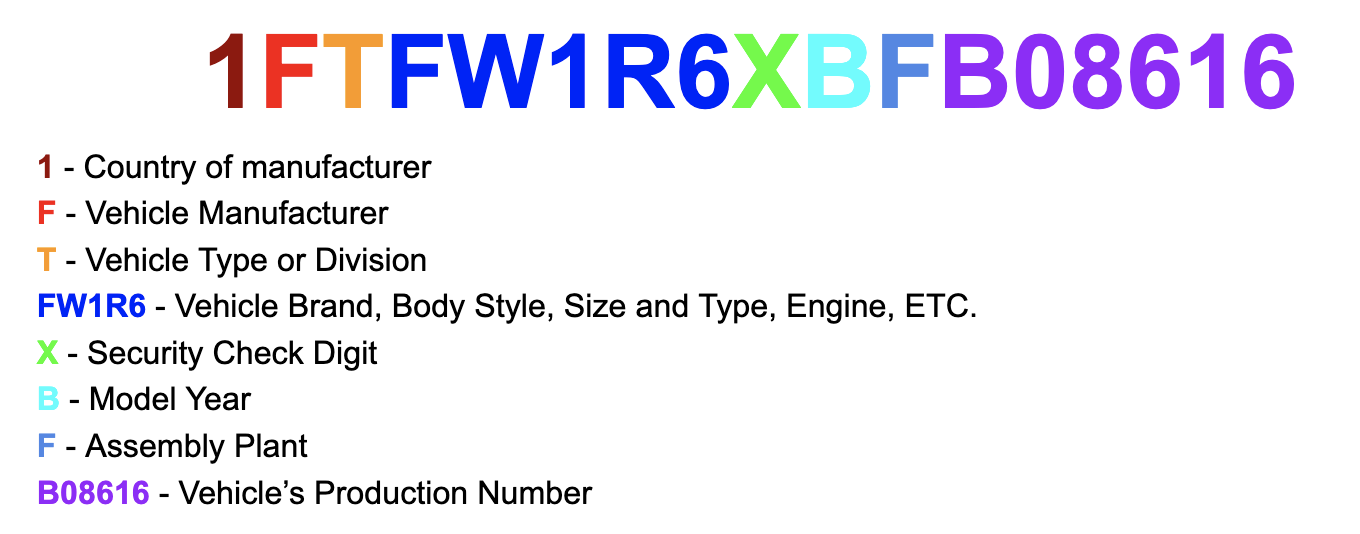
Free VIN Check and VIN Report - Step-by-Step
CoPilot’s VIN check is an excellent way to learn more about your current vehicle or a potential car you plan to purchase. It only requires a few steps to find all the information you need — for free. CoPilot offers one of the best examples of a free VIN lookup.
1. Find your vehicle’s VIN
The first step in a VIN number lookup process is to physically track down the VIN on your vehicle. As mentioned previously, you can locate it on the car’s windshield, on the detail on the driver’s side door, or in the documents that come with the vehicle when purchased.
2. Enter the VIN
Use the VIN search bar (above) to enter every character in your Vehicle Identification Number. Press the “Check this VIN” button, and wait for the vehicle’s information to appear and for the system to analyze the numbers and letters.
3. Get the Vehicle Analysis
The final step of the VIN lookup process is to read through the detailed vehicle details page for the VIN you entered. That page will contain detailed information about the specific car, including access to its CarFax ownership and accident history, as well as other details about that vehicle.
Commonly Asked Questions:
What does a VIN tell you?
A VIN and subsequent VIN lookup will reveal comprehensive information about your vehicle. It describes the location and time of manufacturing, trim level, make and model, recalls, registration, crashes, and more.
Can you look up a VIN for free?
There are many ways to utilize free VIN lookups. CoPilot’s tool is an effective way to learn more about a vehicle without paying anything.
Is vehicle ID the same as VIN?
A vehicle ID is essentially the same as a VIN. They both contain the identity of the vehicle and reveal details about the system that are integral to its creation. If you hear someone refer to the vehicle ID, they’re likely talking about the VIN.
How long is a VIN number?
When typing a number into a VIN search, it comes in a standard 17 characters. This set has been the standard since 1981.
Can I look up my vehicle specs using the VIN?
You can easily find vehicle specs using your VIN. Searching the number will reveal relevant details, such as the engine. You can use this information for your benefit, whether you’re selling the car to someone else or trying to purchase a new car for yourself.
Can I perform a VIN lookup on an older car?
A VIN finder makes it simple to look up information about any vehicle. Even an older car, so long as it’s newer than 1981, should be easy to plug into any VIN finder tool.
Is it OK to tell someone your VIN?
It’s safe to tell someone a VIN. If you’re selling, they can use your number in a VIN search to determine helpful information about the vehicle.
How do you find the engine size from a VIN?
If you’re curious what engine is in your car and want to use your VIN to investigate, check out the characters in the 4-8 position to determine this information. A decoder will make it easy to determine the engine size already placed inside the vehicle.
Is it possible to change a VIN number?
Changing a vehicle’s VIN is uncommon, but may be possible depending on the circumstances. There is typically regulatory and legal paperwork, as well as costs involved.
Can I tell what kind of car I have by the VIN?
It’s possible to look at various vehicle specs by VIN, including its year, make, and model.